Work in a project
Usage and cost
Review spending, tokens, and delegated work across saved conversations.
Run /usage to open Vera’s local usage page in your browser. It reads the
session files in your Vera home and summarizes past work. For reminders and
approval during active work, use conversation budgets.
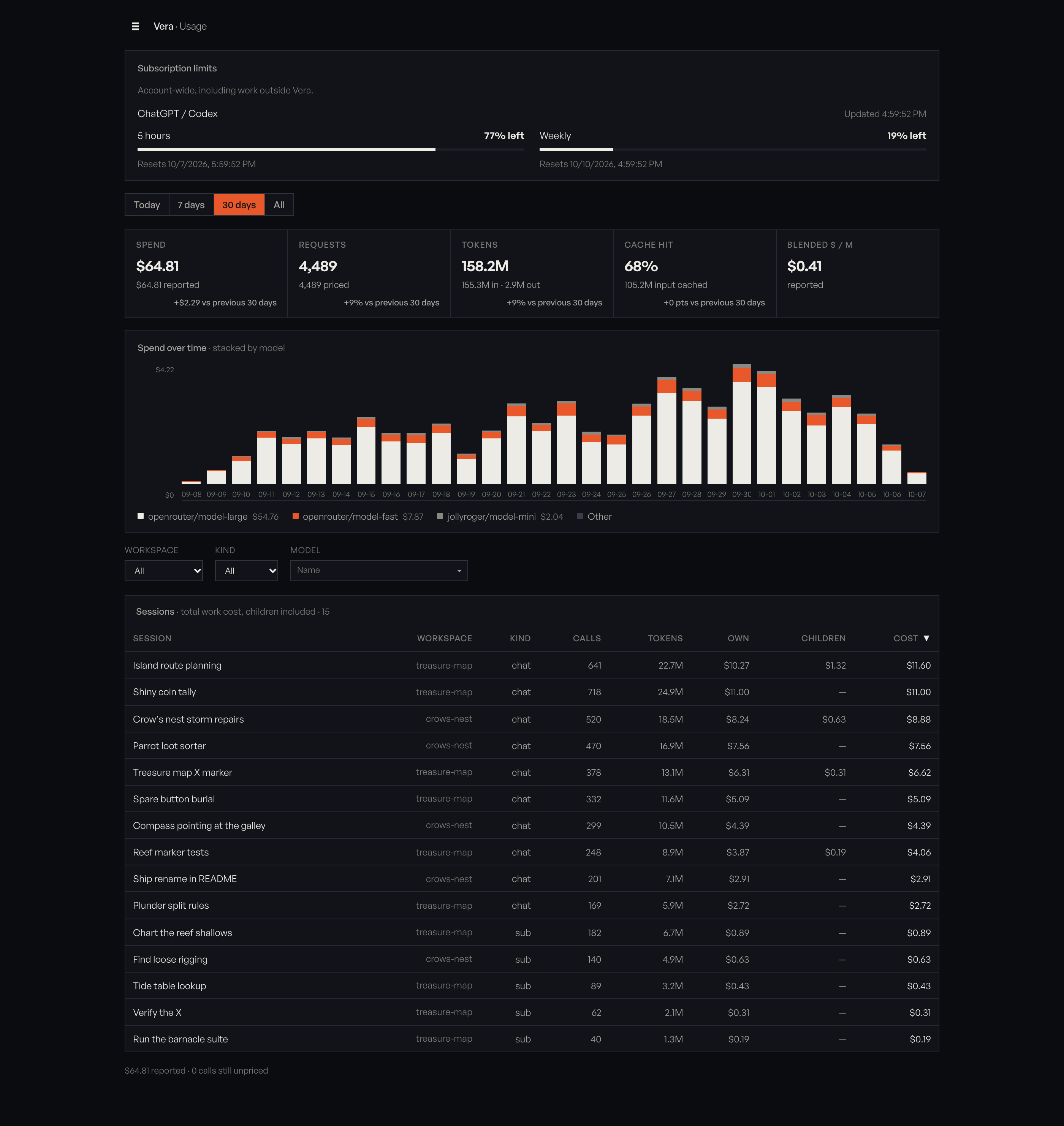
Model calls recorded by Python workflows in the Vera
home count toward the summary cards, the chart, and the model list. They do
not appear as conversations in the table. The /runs page shows them per run.
The page is served locally by the helper started with your host. Opening it leaves your conversation running.
Check subscription limits
When ChatGPT is connected, the page asks the subscription service for your current limits using Vera’s saved sign-in. The Subscription limits section shows the percentage left in each window and its reset time in your local timezone. These limits cover the whole account, including work outside Vera.
The section refreshes once a minute while the overview is open. Changing the report’s time range or filters does not change subscription limits. They are separate from recorded tokens and cost.
When a Codex model is selected, the terminal shows the 5-hour and weekly
percentages left on the row below the composer, on the left, for example
5h 72% left · week 96% left. While Vera is working, that row also shows what
it is doing and how to stop it. If the window is too narrow for both, the
limits step aside until the turn ends. The composer does not move either way.
The limits refresh once a minute. Open /usage for the reset times and the
full account limits. Footer layout can move or hide them.
If the saved sign-in has expired, or the service returns no usable limits, the section is hidden. Vera’s normal connection flow handles sign-in and token refresh. The local usage report remains available.
Choose a time range
The page starts with the last seven days. Choose Today, 30 days, or All at the top. All reads every session file and can take longer. Previously loaded ranges can be reused more quickly.
Read the summary
The summary cards cover the entire time range. Filters on the conversation table do not change these totals.
| Card | Meaning |
|---|---|
| Spend | Reported billed cost plus available estimates, with unpriced calls counted separately. |
| Requests | Recorded model calls, including compaction, classification, and extension side questions when usage was saved. |
| Tokens | Input plus output tokens, with each shown separately. |
| Cache hit | Cached input as a proportion of input tokens. Cache writes appear beside it when a provider reported them. |
| Blended $ / M | Priced spending per million tokens. Blank when there are no tokens. |
Comparisons use the preceding window of the same length. All has no previous window. Cache-hit change is measured in percentage points.
For ranges longer than Today, the chart shows daily spending by model. The legend lists the top three models and groups the rest as Other.
Find a conversation
Filter the table by workspace, kind, or model. Model searches match model IDs, not conversation titles. Choose a model from the list to restrict results to that exact provider/model route; clear the field to include all models.
Click a column heading to sort. Numeric columns start highest first; names start A to Z. Cost is the default, with newer conversations breaking ties. The table shows 25 rows per page. Tokens are this conversation’s own input plus output, shown separately from cost.
Inspect delegated work
Click a conversation to see its own work and work it launched:
| Field | Includes |
|---|---|
| Calls and Own | This conversation’s recorded calls and cost. |
| Tokens | This conversation’s own input plus output. |
| Children | Work in conversations it launched. |
| Cost | Own and child work combined. |
The detail page includes models, tools, launched sessions, and the selected conversation’s calls. Child calls appear in Children and Models, rather than in the parent’s Calls list. Tokens on the conversation page cover this work, including launched conversations. The transcript remains in Vera.
Use Usage to go back to the overview, or the back link to return one level.
Reported, estimated, and unpriced costs
| Label | Meaning |
|---|---|
| Reported | Cost billed by the provider for that call. It does not change with list prices. |
| Estimated | Tokens multiplied by current OpenRouter list rates, with cached and cache-write tokens at their own rates when listed. The estimate can change when those rates change. |
| Unpriced | No billed cost and no usable rate. Vera leaves the dollar amount blank. |
| Mixed | A row combines pricing states. The dollar figure contains the amounts Vera can calculate. |
Local models and subscription routes may be unpriced. The footer separates reported cost, estimates, and unpriced calls. If any estimate is present, the page labels the rate basis as current OpenRouter rates.
If the page does not open
If the local helper, called the annex, is unavailable, /usage reports that
and asks you to restart the host. It does not start a replacement helper.
If the TUI itself says disconnected, use the host recovery instructions. Opening usage normally does not disconnect the TUI.